 |
|
l
|
ImportCSVDir Imports .csv files.
|
|
l
|
ImportXMLDir Imports .xml files.
|
|
l
|
ExportCSVDir Exports .csv files.
|
|
l
|
ExportXMLDir Exports .xml files.
|
|
1
|
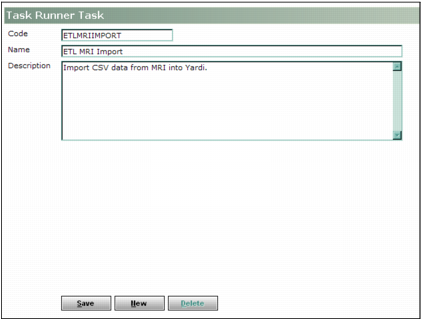
From the Voyager System Administration side menu, Select Admin > Task Runner > Task > Add. The Task Runner Task screen appears.
|
|
2
|
Complete the screen with a unique code and name for the task. (The Code field has a 12-character limit.)
|
|
3
|
|
4
|
 . The
. The |
6
|
Click Save.
|
|
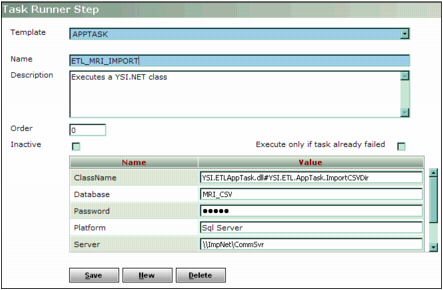
YSI.ETL.AppTask.dll#YSI.ETL.AppTask.TaskClasses.ETLoperation where the ETLoperation string represents one of four classes, as follows:
ysiImportCSVDir Imports .csv files.
ysiImportXMLDir Imports .xml files.
ysiExportCSVDir Exports .csv files.
ysiExportXMLDir Exports .xml files.
For example, if you are configuring Task Runner to automatically import a .csv file, the ClassName would be YSI.ETL.AppTask.dll#YSI.ETL.AppTask.TaskClasses.ysiImportCSVDir (inclusive of all symbols and punctuation).
|
|
|
Type &ForeignDB=foreign database name. Substitute the name of the foreign database that you are using (for example, &ForeignDB=ETLimport).
|
For more information about scheduling these tasks, see the “Task Runner” chapter in the Yardi Service Manager Installation and Setup Guide.